The Intelligence Business Platform.
Everything your business needs in one workspace: manage your records, create content, track sales and put AI agents to work on your own data.
Free to use during early access · Billing is not enabled
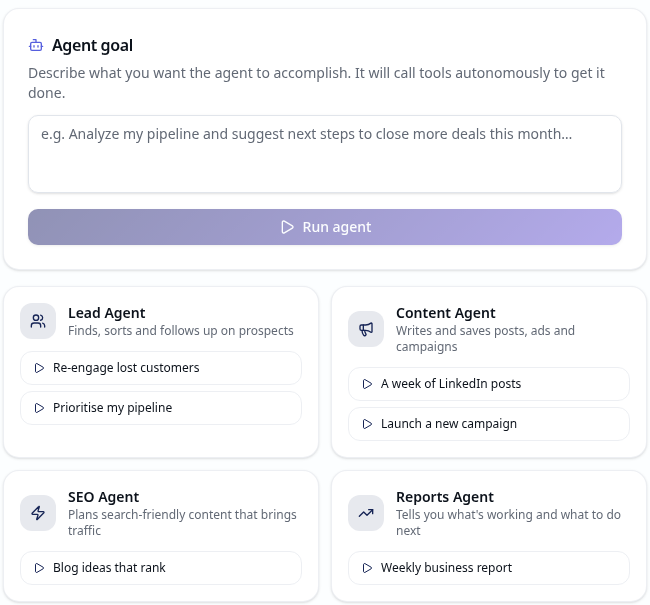
A real view of the AI Agents workspace. Results depend on the business data you add.
Your business work belongs together.
Keep customer records, campaigns, sales and plans in one place — and let AI work with the information you choose to add.
Keep records together
Store customers, leads, deals, campaigns and notes in your own workspace.
Give AI a task
Ask an agent to inspect records, draft content or create a campaign, then review its steps.
Publish when you're ready
Connect LinkedIn or Telegram to publish now or schedule a post for later.
Meet your AI workforce.
Choose a suggested task or write your own goal. See each step the agent takes in the run history.
Lead Agent
Reviews customers and leads to help you prioritise your pipeline.
Content Agent
Drafts copy and can save content or create a campaign in your workspace.
SEO Agent
Suggests search-friendly content ideas and topics to explore.
Reports Agent
Summarises the business records you've added and suggests next steps.
Start with your own information.
No sample numbers are needed. Add a record, ask a question, then check what an agent did.
Add a real record
Enter a customer, lead or deal so the workspace has something to work with.
Ask the assistant
Ask a business question or add plans and notes to the library for more relevant answers.
Run an agent
Choose a suggested task and review its actions and results in run history.
Explore the workspace.
Practical tools for your customers, content, sales and decisions — using the data you enter, not made-up results.
AI Assistant
Ask questions, draft ideas and get answers informed by your workspace library.
Marketing Center
Create campaigns and content. Publish or schedule posts to connected LinkedIn and Telegram accounts.
Sales Center
Manage leads and deals, view your pipeline, score opportunities and estimate sales.
SEO Center
Keep a keyword list, plan blog topics and work through an SEO checklist.
Customer Manager
Keep real customer records and notes together in your workspace.
Reports
See revenue and pipeline figures based on the records you add, with CSV export.
Workspace Library
Store marketing plans, sales playbooks, templates and notes for your team and AI assistant.
Sent History & Audit Log
Review published posts and keep a record of sign-ins, approvals and agent activity.
Free during early access.
Payments are not set up. You can explore the workspace and its four agent task options without choosing a paid plan. AI assistant usage is limited to 50 messages per day.
Open the workspaceQuestions, answered.
Do I need to connect anything to get started?
No. Create an account and every module opens right away. Your plans, playbooks, templates and notes live in your own workspace library.
Is my data private?
Yes. Your profile and activity are scoped to your account with row-level security, so no other user can read them. Sign-ins, consent approvals and agent tool calls are recorded in your own audit log.
What powers the AI assistant?
A hosted large language model, called from our backend so the API key never reaches your browser. It can also use your workspace library as context when you ask business questions.
Can other tools or AI agents connect to my workspace?
Yes, through the built-in agent (MCP) integration. Agents must sign in and approve consent first, and every tool call they make is written to your audit log.
What does it cost right now?
Billing isn't enabled yet. The workspace is free to use during early access; the AI assistant currently has a 50-message daily limit. No paid plans are active.
I forgot my password. What now?
On the sign-in page, enter your email and click "Forgot password?". We'll email you a secure link to set a new one.